
Via Steam Client
Information supplied by “Wallakh”
First download the Ultima installer from the Ultima website.
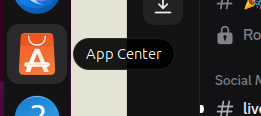
Install the Steam Client next. This is usually done within the OS in the App or software center.
Open the steam client there is a small ‘add a game’ option at the bottom left of the Steam client. Click it and the select ‘add a non steam game…’.

On the ‘Add a non steam game’ screen click ‘browse’ and select your download folder where the Ultima installer is that you downloaded. Select the Ultima installer and click the blue ‘add selected program. Important ::
Now go back to the Steam client and you’ll see the installer was added to Steam, RIGHT click the installer and select properties. Once you have selected properties click on ‘compatibility’ in the menu and check ‘Force the use of a specific Steam Play compatibility tool’.
Under that option select ‘Proton Experimental’ from the menu.
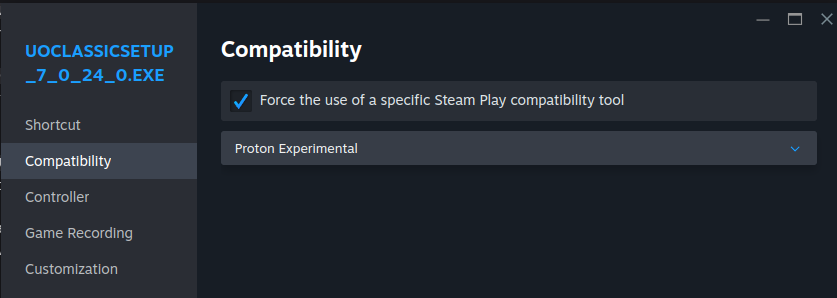
Click the X to close that screen after you select those options.
Now simply click the big green PLAY button and install Ultima. This part can be tricky: Where you choose to install Ultima is Important : Make sure you install Ultima to your Home folder by clicking the Z:/ drive and select the ‘Home’ folder and your username and click install. Your username, obviously, being YOUR username.
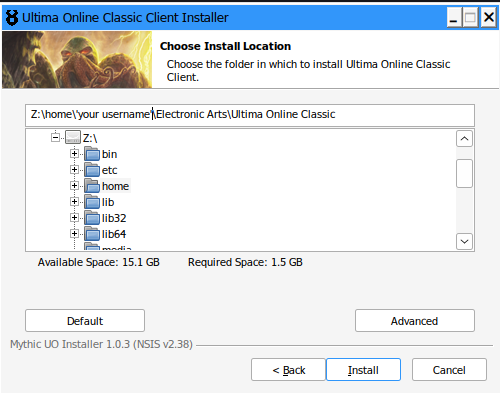
(This is the hardest part of it all.)
We are not done yet, after it has installed we have installed Ultima but cannot get to it, so you have to add it to steam the same way we added the Ultima installer. Click ‘add a game’ and ‘Add a non steam game’, browse, choose the Ultima folder and click the UO.exe. Now we have added Ultima to Steam after it was installed but are still not done, You need to ‘right click’ the UO,exe, select properties, compatibility and check ‘force the use of a specific Steam Play compatibility tool’ and ‘proton experimental’.
Done click Play